디자인킷 · 반폭
반폭 · 슬로프(전후 2점, 3~5항목)
D-반폭-슬로프4항목
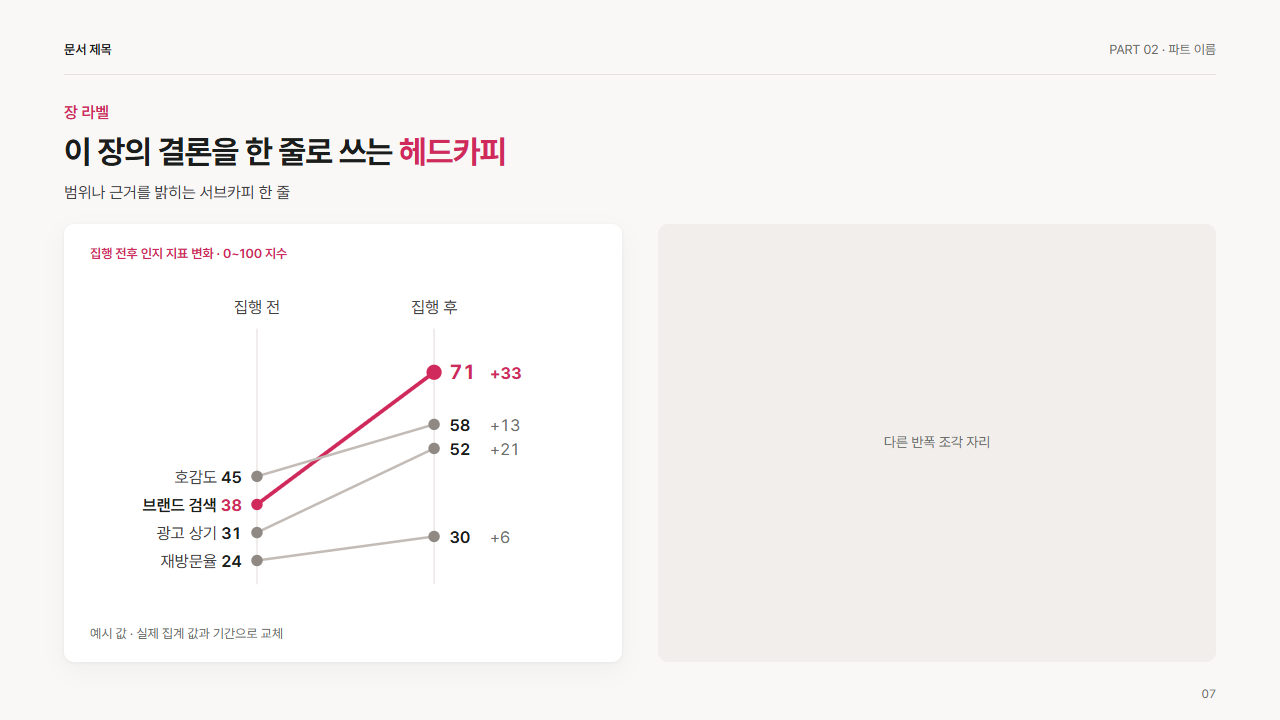
언제 쓰는가
두 시점 사이에 항목들이 얼마나 가파르게 변했는지, 순위가 바뀌었는지를 절반 칸에. 항목 3~5개, 강조는 기울기가 가장 큰 한 줄. 같은 쪽 값끼리 5 이상 떨어져야 글자가 겹치지 않음. 항목 이름 6자 이내. 값 바꾸는 법: 점 y = 222 − (값 − 축 최솟값) ÷ (축 최댓값 − 축 최솟값) × 190(예시 축 20~80). 왼쪽 점 x = 132, 오른쪽 점 x = 272. 각 line 의 y1 = 전 값 y, y2 = 후 값 y. 왼쪽 글자(이름 + 전 값)는 x 120 에 text-anchor end, 오른쪽 후 값은 x 284, 변화 폭은 x 316, 글자 y = 점 y + 5. 강조 줄은 line class="sl hot", 점 class="f-a". 같은 쪽 글자 y 가 16 미만으로 붙으면 축 범위를 좁혀 간격을 벌린다.
참고
Financial Times Visual Vocabulary(https://github.com/Financial-Times/chart-doctor/tree/main/visual-vocabulary)의 Change over Time 분류(slope)와 Storytelling with Data(https://www.storytellingwithdata.com)의 slopegraph 사례(양끝에 이름과 값 직접 표기, 한 줄만 강조)를 참고. 직접 제작.
조각
<div class="dk dkh dkh-g-slope"><div class="dk-card"><p class="dk-lb">집행 전후 인지 지표 변화 · 0~100 지수</p>
<div class="cv"><svg width="100%" viewBox="0 0 400 236" preserveAspectRatio="xMidYMid meet" role="img">
<line x1="132" y1="26" x2="132" y2="228" class="gr"/><line x1="272" y1="26" x2="272" y2="228" class="gr"/><text x="132" y="14" text-anchor="middle" class="k">집행 전</text><text x="272" y="14" text-anchor="middle" class="k">집행 후</text>
<line x1="132" y1="165" x2="272" y2="60.5" class="sl hot"/><circle cx="132" cy="165" r="4.5" class="f-a"/><circle cx="272" cy="60.5" r="6" class="f-a"/><text x="120" y="170" text-anchor="end" class="v">브랜드 검색 <tspan class="va">38</tspan></text><text x="284" y="65.5" class="va t16">71</text><text x="316" y="65.5" class="va">+33</text>
<line x1="132" y1="142.8" x2="272" y2="101.7" class="sl"/><circle cx="132" cy="142.8" r="4.5" class="f-g3"/><circle cx="272" cy="101.7" r="4.5" class="f-g3"/><text x="120" y="147.8" text-anchor="end" class="k">호감도 <tspan class="v">45</tspan></text><text x="284" y="106.7" class="v">58</text><text x="316" y="106.7">+13</text>
<line x1="132" y1="187.2" x2="272" y2="120.7" class="sl"/><circle cx="132" cy="187.2" r="4.5" class="f-g3"/><circle cx="272" cy="120.7" r="4.5" class="f-g3"/><text x="120" y="192.2" text-anchor="end" class="k">광고 상기 <tspan class="v">31</tspan></text><text x="284" y="125.7" class="v">52</text><text x="316" y="125.7">+21</text>
<line x1="132" y1="209.3" x2="272" y2="190.3" class="sl"/><circle cx="132" cy="209.3" r="4.5" class="f-g3"/><circle cx="272" cy="190.3" r="4.5" class="f-g3"/><text x="120" y="214.3" text-anchor="end" class="k">재방문율 <tspan class="v">24</tspan></text><text x="284" y="195.3" class="v">30</text><text x="316" y="195.3">+6</text>

</svg></div>
<p class="nt">예시 값 · 실제 집계 값과 기간으로 교체</p></div></div>
스타일
.dkh-g-slope .dk-card{display:flex;flex-direction:column;padding:20px 26px 18px}
.dkh-g-slope .dk-lb{flex:none;margin:0 0 10px}
.dkh-g-slope .nt{flex:none;font-size:var(--f-cap);color:var(--mu);margin:8px 0 0}
.dkh-g-slope .cv{flex:1;min-height:0;position:relative}
.dkh-g-slope .cv svg{position:absolute;left:0;top:0;width:100%;height:100%;display:block}
.dkh-g-slope svg text{font-family:inherit;font-size:13px;fill:var(--mu);font-variant-numeric:tabular-nums}
.dkh-g-slope svg .k{fill:var(--ink2)}
.dkh-g-slope svg .v{fill:var(--ink);font-weight:600}
.dkh-g-slope svg .va{fill:var(--ac);font-weight:700}
.dkh-g-slope svg .on{fill:var(--card);font-weight:600}
.dkh-g-slope svg .t14{font-size:14px}
.dkh-g-slope svg .f-a{fill:var(--ac)}
.dkh-g-slope svg .f-w{fill:var(--acw)}
.dkh-g-slope svg .f-s{fill:var(--soft)}
.dkh-g-slope svg .f-c{fill:var(--card)}
.dkh-g-slope svg .f-g1{fill:var(--g1)}
.dkh-g-slope svg .f-g2{fill:var(--g2)}
.dkh-g-slope svg .f-g3{fill:var(--g3)}
.dkh-g-slope svg .f-g4{fill:var(--g4)}
.dkh-g-slope svg .ax{stroke:var(--line2);stroke-width:1;fill:none}
.dkh-g-slope svg .gr{stroke:var(--line);stroke-width:1;fill:none}
.dkh-g-slope svg .sl{stroke:var(--g2);stroke-width:2;fill:none}
.dkh-g-slope svg .sl.hot{stroke:var(--ac);stroke-width:3}
.dkh-g-slope svg .t16{font-size:16px}