디자인킷 · 도식
매장 동선과 접점 3곳
D-도식-매장동선
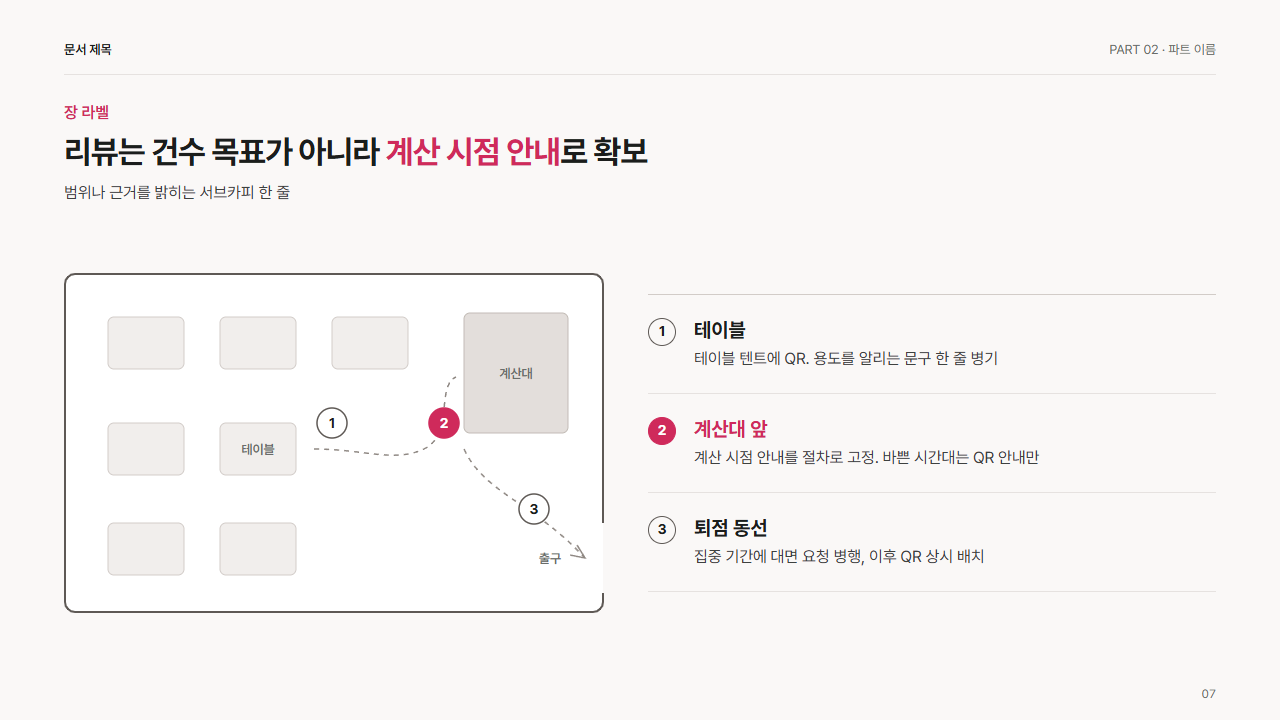
언제 쓰는가
매장 평면(테이블, 계산대, 출구)에 고객 동선을 긋고 리뷰 요청·QR 안내 같은 접점을 번호 3곳으로 표시하는 도식. 오른쪽에 접점별 안내 방식. 리뷰 수집 동선, 매장 안 QR 배치, 오프라인 전환 장치 위치 설명에 사용. 접점 3개 고정, 접점마다 설명 2줄(약 35자). 강조 접점 1개. 값 바꾸는 법: 오른쪽 접점 3개의 이름과 설명 교체. 평면도의 번호 위치는 g.no 안 circle 의 cx·cy 와 text 의 x·y(= cy + 5)를 함께 수정. 테이블(g.tb 의 rect), 계산대(rect.ct), 동선(path.pt) 좌표를 바꿔 매장 구조에 맞춤. 강조 접점은 g.no 와 li 양쪽에 class="hot".
참고
평면도 위에 접점을 번호로 찍고 옆에 풀이를 다는 방식은 서비스 디자인의 service blueprint·매장 동선도 표기와 SlideModel 의 floor plan 템플릿 구성 참고. SVG 직접 제작.
조각
<div class="dk dk-store">
<svg width="540" height="340" viewBox="0 0 540 340" role="img" aria-label="매장 평면과 고객 동선">
<rect class="fl" x="1" y="1" width="538" height="338" rx="10"/>
<path class="wall" d="M1 11a10 10 0 0 1 10-10H529a10 10 0 0 1 10 10V250M539 320v9a10 10 0 0 1-10 10H11a10 10 0 0 1-10-10V11"/>
<g class="tb"><rect x="44" y="44" width="76" height="52" rx="6"/><rect x="156" y="44" width="76" height="52" rx="6"/><rect x="268" y="44" width="76" height="52" rx="6"/><rect x="44" y="150" width="76" height="52" rx="6"/><rect x="156" y="150" width="76" height="52" rx="6"/><rect x="44" y="250" width="76" height="52" rx="6"/><rect x="156" y="250" width="76" height="52" rx="6"/></g>
<text x="194" y="181" text-anchor="middle" class="lb">테이블</text>
<rect class="ct" x="400" y="40" width="104" height="120" rx="6"/>
<text x="452" y="105" text-anchor="middle" class="lb">계산대</text>
<text x="486" y="290" text-anchor="middle" class="lb">출구</text>
<path class="pt" d="M250 176C300 176 330 190 360 176S372 112 392 104"/>
<path class="pt" d="M400 176C420 220 470 230 520 284"/>
<path class="ar" d="M513 272l8 13-15-3"/>
<g class="no"><circle cx="268" cy="150" r="15"/><text x="268" y="155" text-anchor="middle">1</text></g>
<g class="no hot"><circle cx="380" cy="150" r="15"/><text x="380" y="155" text-anchor="middle">2</text></g>
<g class="no"><circle cx="470" cy="236" r="15"/><text x="470" y="241" text-anchor="middle">3</text></g>
</svg>
<ol>
<li><span class="n num">1</span><div><h3>테이블</h3><p>테이블 텐트에 QR. 용도를 알리는 문구 한 줄 병기</p></div></li>
<li class="hot"><span class="n num">2</span><div><h3>계산대 앞</h3><p>계산 시점 안내를 절차로 고정. 바쁜 시간대는 QR 안내만</p></div></li>
<li><span class="n num">3</span><div><h3>퇴점 동선</h3><p>집중 기간에 대면 요청 병행, 이후 QR 상시 배치</p></div></li>
</ol>
</div>
스타일
.dk-store{display:grid;grid-template-columns:540px minmax(0,1fr);gap:44px;align-items:center}
.dk-store svg{display:block}
.dk-store .fl{fill:var(--card)}
.dk-store .wall{fill:none;stroke:var(--g4);stroke-width:2}
.dk-store .tb rect{fill:var(--soft);stroke:var(--line2);stroke-width:1}
.dk-store .ct{fill:var(--g1);stroke:var(--g2);stroke-width:1}
.dk-store .lb{font-size:13px;font-weight:600;fill:var(--mu)}
.dk-store .pt{fill:none;stroke:var(--g3);stroke-width:1.5;stroke-dasharray:5 5}
.dk-store .ar{fill:none;stroke:var(--g3);stroke-width:1.5}
.dk-store .no circle{fill:var(--card);stroke:var(--g4);stroke-width:1.5}
.dk-store .no text{font-size:14px;font-weight:700;fill:var(--ink)}
.dk-store .no.hot circle{fill:var(--ac);stroke:var(--ac)}
.dk-store .no.hot text{fill:var(--card)}
.dk-store ol{list-style:none;margin:0;padding:0}
.dk-store li{display:grid;grid-template-columns:30px minmax(0,1fr);gap:16px;padding:22px 0;border-bottom:1px solid var(--line)}
.dk-store li:first-child{border-top:1px solid var(--line2)}
.dk-store .n{width:28px;height:28px;border-radius:50%;border:1.5px solid var(--g4);font-size:var(--f-sm);font-weight:700;display:flex;align-items:center;justify-content:center;margin-top:1px}
.dk-store .hot .n{background:var(--ac);border-color:var(--ac);color:var(--card)}
.dk-store h3{margin:0 0 4px;font-size:var(--f-lg);font-weight:700;line-height:1.3}
.dk-store .hot h3{color:var(--ac)}
.dk-store li p{margin:0;font-size:var(--f-body);color:var(--ink2);line-height:1.5}